Set your prices
Quick answerType a price beside each service you ticked, then Save changes. Leave one blank to type it on each job, or mark it Included to show it at no charge.
You set every price yourself, and you can change them anytime.
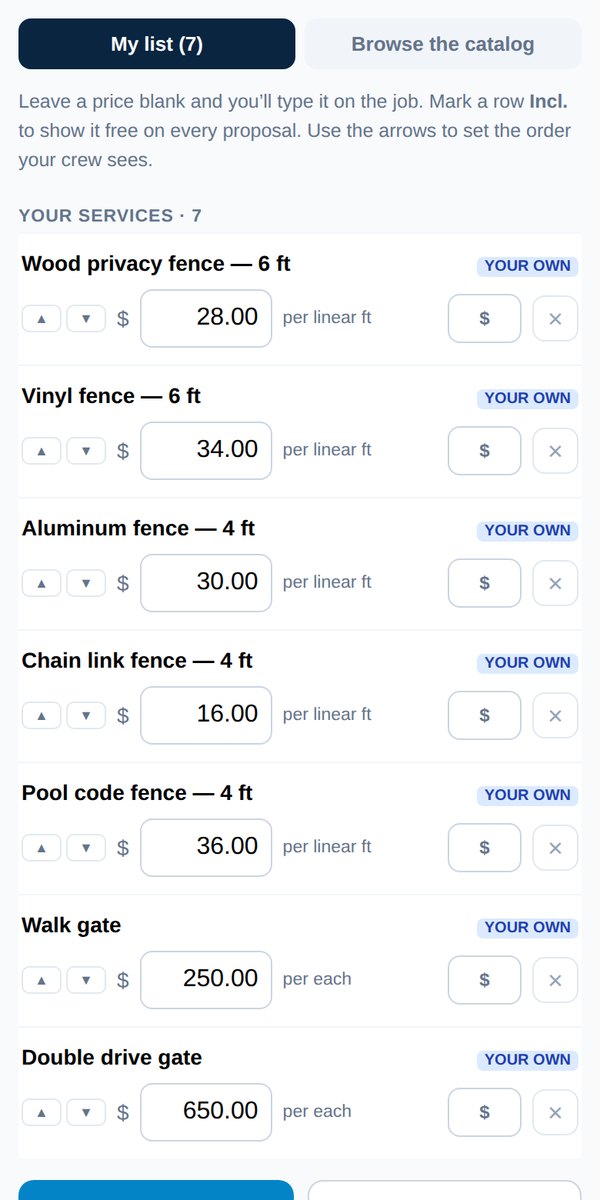
- Open your dashboard and tap Your services.
- Type a price beside each service. Some are per unit (per foot, per window), some are one flat price. The row tells you which.
- Tap Save changes. Your form uses the new prices straight away.
Three handy options
- Leave a price blank: you'll type the rate on each job. Good for work that's never the same twice.
- Included, no charge: the customer sees the word Included, not $0.00.
- Reorder: use the arrows to put your most-used services at the top. Your form uses the same order.
"One price is still $0.00" means a row you ticked has no price and isn't marked Included. Price it, mark it Included, or untick it.
Was this helpful?